
Authentication
BoldSales API uses API key-based authentication to authorize and validate all requests.
To make an API request, you must include a valid API key in the request header to authenticate your identity.
Note:
- API keys are user-specific, and the permission scope is determined by the user's permission set within the CRM.
- Each user can have only one active API key at a time.
Steps to Find Your API Key
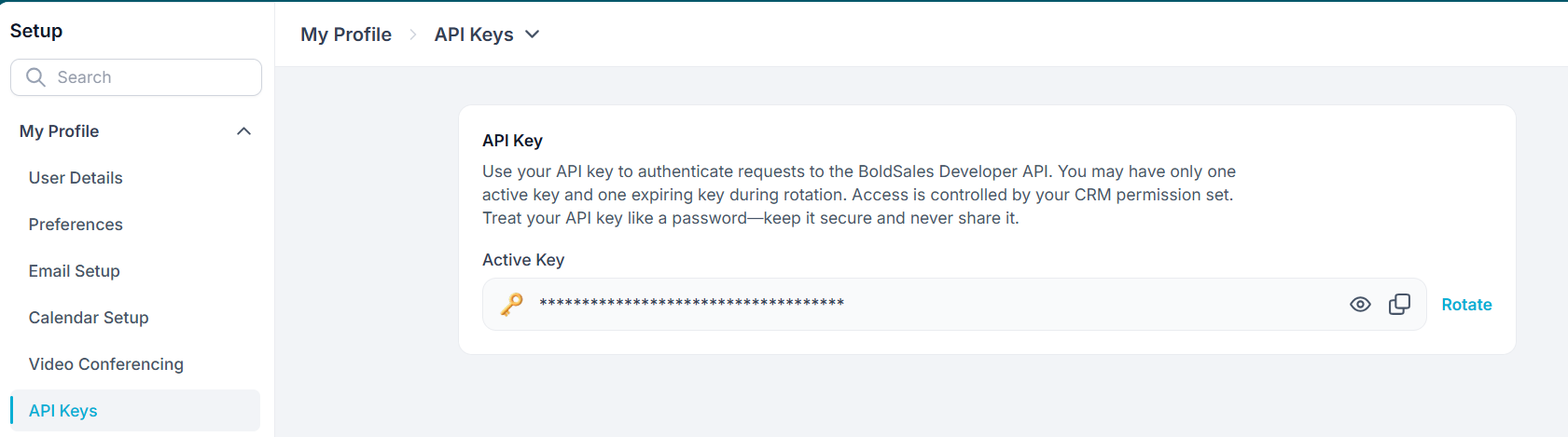
Step 1: Go to your profile settings {your domain}/setup/profile
Step 2:
- In the left sidebar under My Profile, click on API Keys
- The main content panel will display your API key information
Step 3: Manage Your API Key
- Your Active Key will be displayed with masked characters for security
- Click the eye icon to view your full API key
- Click the copy icon to copy your API key to clipboard
- Click Rotate to generate a new key. The old key will expire based on the selected duration (either immediately or after 2 days)
Step 4: Use the copied token in the HTTP header when making API requests.
Example:
curl -X 'GET' \
  'https://{yourdomain}/api/v1/contacts' \
  -H 'x-api-key: {your API key}'